2021/8/12にGitHubからメールがきた。
|
[GitHub] Deprecation Notice
Hi @xxxxx, You recently used a password to access the repository at weekbosons/COVID19 with git using git/2.24.3 (Apple Git-128).
Thanks, |
2021/8/13以降、Githubにcliアクセスする時は、passwordを使ったBASIC認証は動かなくなる。今後はPAT(Personal Access Token)を使えとのこと。id?,password?つかった覚えがない。。。。
案内どおりすすめ、Githubのページで、PATは作成できた。
|
[GitHub] A personal access token has been added to your accoun Hey @xxxx, A personal access token (NewPersonalAccessToken) with repo scope was recently added to your account. Visit https://github.com/settings/tokens for more information.
Thanks, |
そして、8/13が来た。ローカルrepoの更新を、github上のリモートrepoに反映しようとして、git pushしたら、エラーになった。
$ git push
remote: Support for password authentication was removed on August 13, 2021. Please use a personal access token instead.
remote: Please see https://github.blog/2020-12-15-token-authentication-requirements-for-git-operations/ for more information.
fatal: unable to access ‘https://github.com/xxxxxxxx.git/’: The requested URL returned error: 403
メッセージにはPATを使うように書いてある。しかし、github上で作成したPATを、どこで、どのように、設定するのか?その方法は、誰もおしえてくれない。
Google検索し、MacOS上での設定方法を捜した。
■macOS キーチェーンからの認証情報を更新する
■Mac が覚えている GitHub のパスワードをパーソナルアクセストークンに変更する
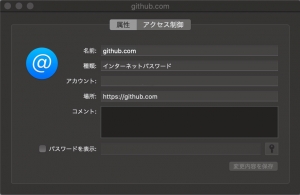
MacOSのキーチェーンのパスワードにPATを設定すればいいと書いてあった。設定すると、設定ダイアログボックスが開く、パスワードを要求してくる。どのパスワード?PATかと思って入力すると、失敗。MacOSへのログインパスワードだった。
だれも教えてくれない。
たしかに、git pushできるようになった。
$ git push origin work
Total 0 (delta 0), reused 0 (delta 0)
To https://github.com/xxxxxx.git
7c3895d..1d4da32 work -> work
しかし、なぜ、キーチェーンなのか?わからない。だれも教えてくれない。
Gitが古いだけ?ソースからbuildし、バージョンアップすれば解決することに期待し、Gitのサイトからソースをダウンロードしていた。
May the Source be with you!Gitの中、どこで、MacOSのキーチェーンを処理しているのか?Gitのソースを読んめばわかるか?。
cat git-/contrib/credential/osxkeychain/git-credential-osxkeychain.c
static void add_internet_password(void)
{
/* Only store complete credentials */
if (!protocol || !host || !username || !password)
return;
if (SecKeychainAddInternetPassword(
KEYCHAIN_ARGS,
KEYCHAIN_ITEM(password),
NULL))
return;
}
確かに、PATを設定した、MacOSキーチェーンのパスワードをクレデンシャルとして読みこんでいた。Git自身がMacOSのキーチェーンをクレデンシャルとして使っている。でも、なぜ、Gitが、クレデンシャルにMacOSのキーチェーンを使っているのか?
わからない。だれも教えてくれない。
Gitが自身の構成情報で、MacOSのキーチェーンを使う指定をしているのか?gitの構成情報を参照した。
git config -l credential.helper=osxkeychain
確かにgitはMacoSキーチェーンをクレデンシャルのヘルパーとして認識している。でも、私はそんな設定をした覚えがない。レポジトリのあるディレクトリにあるgit configファイルを読んでみた。そこには、なにも記述がない。当たり前、私がそんな設定をした覚えがないのだから。もしや?とおもい、ログインホームディレクトリにあるgitのconfigファイルを読んでみたが、そこにも、なにも記述がない。
git config –local -l
git config –global -l
MacoSキーチェーンをクレデンシャルのヘルパーとしている箇所はない。
たしか、このgitは、Xcodeをインストールしたとき、Xcodeがインストールしたもの
whereis git
/usr/bin
/usr/binにあるようだ。
/usr/bin/git –version
ME866JA:Kawasaki momma$ git –version
git version 2.24.3 (Apple Git-128)
と打つと、Apple-128とある。Apple謹製gitはなにかちがうのか?
救いの手は、Googleからきた。
disable git credential-osxkeychain どうも、Xcodeに、設定があるようだ。確かに記載があった。
git config –get-all –show-origin credential.helper
file:/Applications/Xcode.app/Contents/Developer/usr/share/git-core/gitconfig osxkeychain
結局、Apple謹製gitは、MacOSキーチェーン使用がデフォルト設定だった事が、判明した。ネットには、どうすればいい?こうすればいい。と、表面上の情報だけが、散らばっているだけ。ある意味、ノイズ。その本質を追究し、ネット上で共有しシグナルを発信してくれる人は、本当に少なくなった。
ネットのS/N比、かなり悪くなった。
コメントを残す